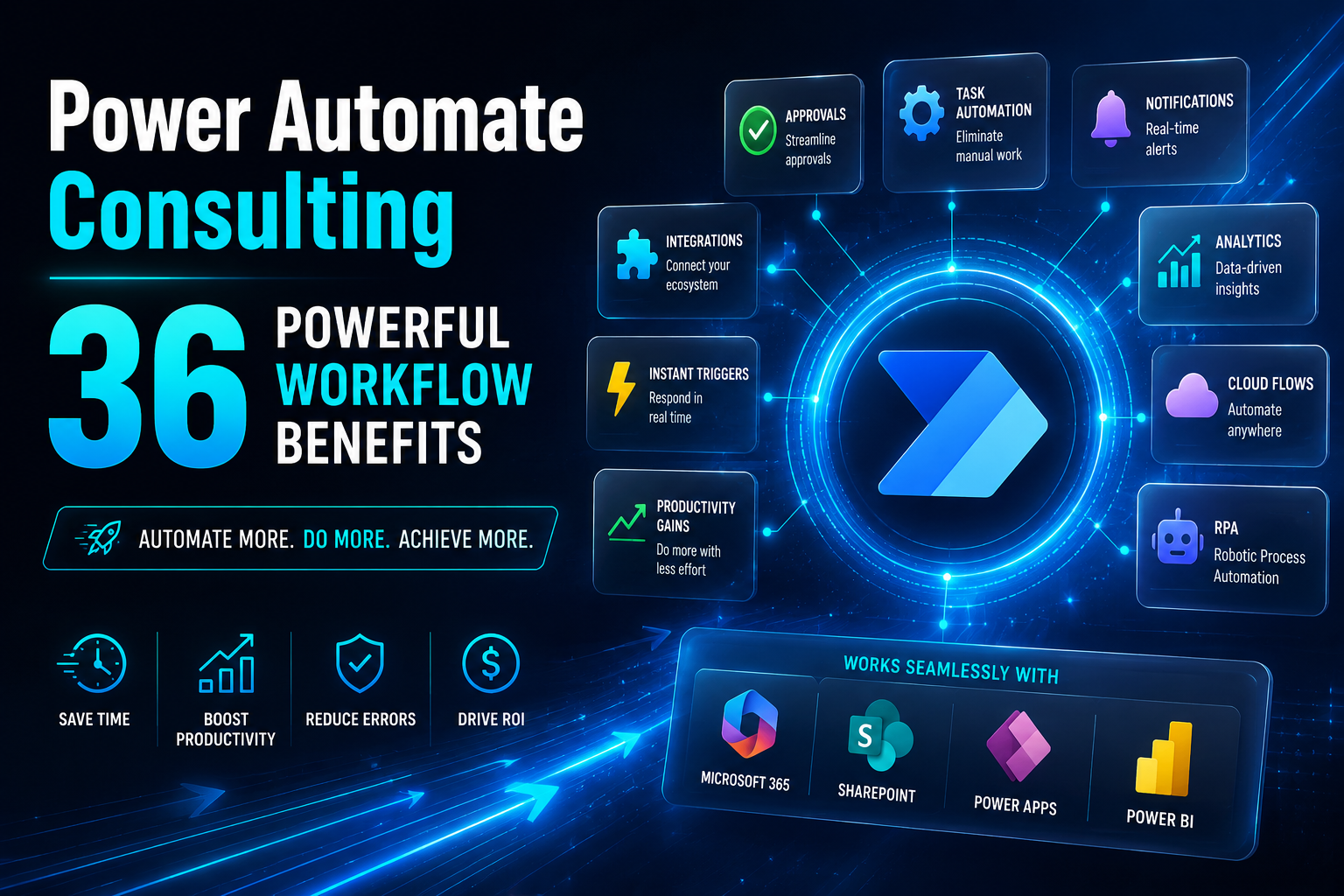
Power automate consulting helps businesses turn slow manual work into faster and smarter digital systems. If your team spends too much time on approval requests data entry notifications reports or repetitive tasks the right consultant can help you automate the work without making the process confusing. Many companies already use Microsoft 365 SharePoint, Power Apps Power BI Dynamics 365 and other apps and services. The problem is that these tools often work separately. That creates manual work missed updates slow decisions and poor resource allocation.
This guide explains how Microsoft Power Automate can improve workflow efficiency when power automate consulting services make sense and how a power automate consulting company can help your business build practical automation. You will also learn how to choose the right workflow to automate when RPA is useful and how Power Platform supports digital transformation.
What Is Power Automate Consulting?

Power automate consulting is the process of helping a business plan build test and improve automation with Microsoft Power Automate. Many teams know they want to automate but they do not know which workflow should come first. A good consultant helps you avoid random automation and focus on business process improvement. Power Automate consulting is useful because automation should solve a real business problem. It should not create more steps for employees. It should streamline work reduce delays and make daily operations easier to manage.
How Microsoft Power Automate Helps Businesses
Microsoft Power Automate helps businesses connect tools automate workflows and reduce manual steps across daily operations. It can send a notification when a form is submitted create an approval request update SharePoint records and move information between systems. The platform works well for teams already using Microsoft 365. It can connect email Teams Share Point Excel Power Apps Power BI Dynamics 365 Azure and third party tools through a connector. This makes automation more seamless because the business can keep using familiar tools. Microsoft Power Automate was also known as Microsoft Flow. Today it is part of the Power Platform and supports both cloud automation and desktop automation.
Why Businesses Need a Power Automate Consultant
A power automate consulting helps businesses understand what should be automated and how to build it correctly. Without expert support teams may build flows that work at first but become hard to manage later. A consultant reviews your workflow identifies weak points checks data movement, and plans automation around real business needs. The goal is not only to automate processes. The goal is to create a reliable system that saves time and improves productivity. A certified Microsoft Power Automate consultant can also help with governance testing security and long term support. This is important when automation affects customers finance inventory management or internal approval workflows.
When Power Automate Consulting Services Make Sense
Power automate consulting services make sense when your team is losing time on repeated work delayed approvals scattered data or disconnected systems. They also help when your business needs automation but lacks the internal skill to implement Power Automate safely. These services are useful for companies that want to automate workflows across Microsoft 365 Power Apps SharePoint and other systems. They are also helpful when a business wants a scalable plan instead of one small flow that breaks after a few months. The practical takeaway is simple. If automation affects important business operations expert guidance can save time and reduce mistakes.
Why Businesses Use Microsoft Power Automate to Automate Workflows
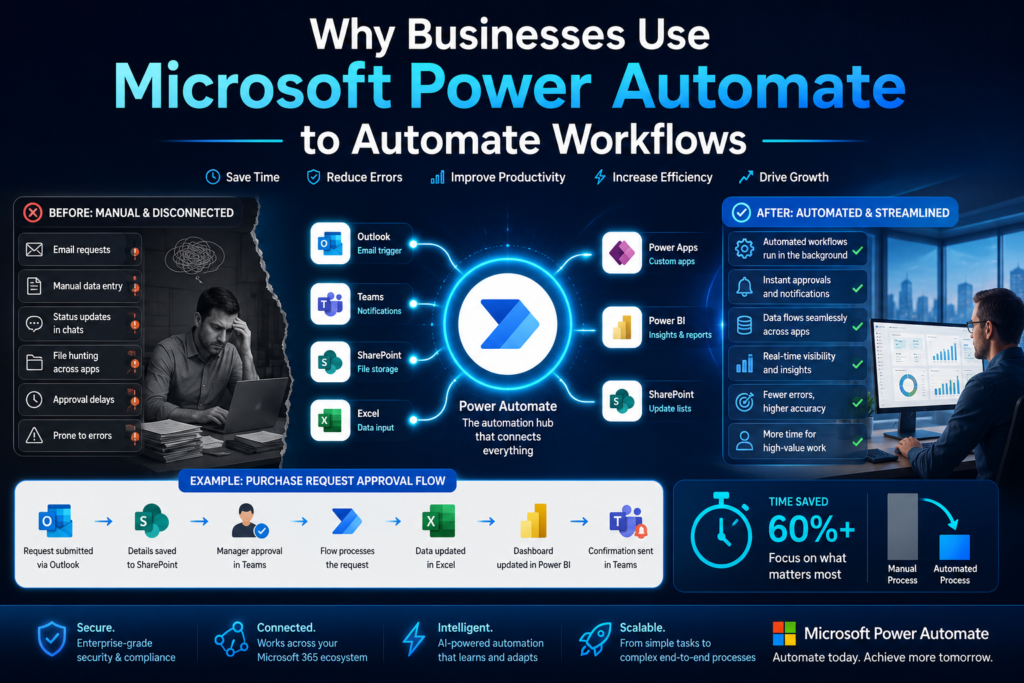
Many businesses use Microsoft Power Automate because manual processes slow down teams. A simple task can become painful when employees repeat it every day. When you automate workflows your team can spend less time on routine work and more time on core business activities. Power Automate streamlines daily work by moving information sending alerts creating approvals and connecting systems. This helps teams work faster and with fewer errors.
Manual Work and Repetitive Tasks That Slow Teams Down
Manual work often feels normal until you measure how much time it takes. Employees may copy data from emails into spreadsheets send the same reminder every week or check multiple systems for updates. These repetitive tasks reduce focus and create delays. Automation solves this by making routine actions happen automatically. For example a customer request can create a record notify the right person and start an approval process without someone manually managing every step. This improves productivity because employees can focus on decisions service sales and planning instead of routine admin work.
How Power Automate Streamlines Daily Operations
Power Automate streamlines daily operations by connecting actions across your digital ecosystem. When one event happens the system can trigger the next step. A form submission can create a task. A new file can start a review. A status change can send a real time notification. Using Power Automate also reduces missed updates. If a manager needs to approve a request the system can send reminders and track progress. This creates a more seamless workflow. Power automate workflows are especially helpful when work moves between departments. Sales support finance HR and operations can all benefit when information moves automatically.
Real Life Workflow Automation Example
Imagine a company where employees submit expense requests through a form. Without automation someone checks the form sends it to a manager updates a spreadsheet and notifies the employee manually. With workflow automation the form can trigger an approval request. After approval the record can update in SharePoint. The employee can receive a notification and finance can see the status in real time. This example shows why businesses automate workflows. The process becomes faster clearer and easier to manage.
Power Platform and Microsoft 365 Automation Benefits
Many businesses already pay for Microsoft tools but do not use their full value. Power Platform helps connect those tools into a stronger automation system. When Microsoft Power Automate works with Power Apps Power BI and Microsoft 365 the business can create better processes without building everything from scratch. The main benefit is connection. Instead of using isolated tools your team can create an ecosystem where data tasks approvals and reporting work together.
How Power Apps, Power BI and Power Automate Work Together
Power Apps helps teams create low code business apps. Power BI helps turn data into reports. Power Automate connects actions between tools and keeps the workflow moving. For example a team can use Power Apps to collect field service data. Power Automate can send that data to SharePoint trigger an approval and notify a manager. Power BI can then show performance and trends. This combination creates strong power automate solutions because it connects data collection process automation and reporting in one digital workflow.
Using SharePoint Dynamics 365 and Azure in Automation
SharePoint is useful for document storage lists and team collaboration. Dynamics 365 helps manage customer and business data. Azure supports cloud based applications and more advanced integration. Power Automate can connect these systems so information moves without repeated manual entry. For example a new customer record in Dynamics 365 can trigger a task update SharePoint and notify the sales team. This creates better integration expertise across the Microsoft ecosystem. It also helps businesses build automation that supports daily work and future growth.
Why the Microsoft Ecosystem Supports Scalable Growth
The Microsoft ecosystem supports scalable growth because many businesses already use its tools. When automation is built inside this ecosystem employees do not need to learn a completely new environment. Scalable automation matters because a small business process can become more complex over time. A flow that handles ten requests per week may later need to handle hundreds. A good consultant designs automation with future growth in mind. The practical takeaway is that Microsoft tools can support digital transformation when they are connected through smart automation.
Power Automate Consulting Services for Business Process Optimization
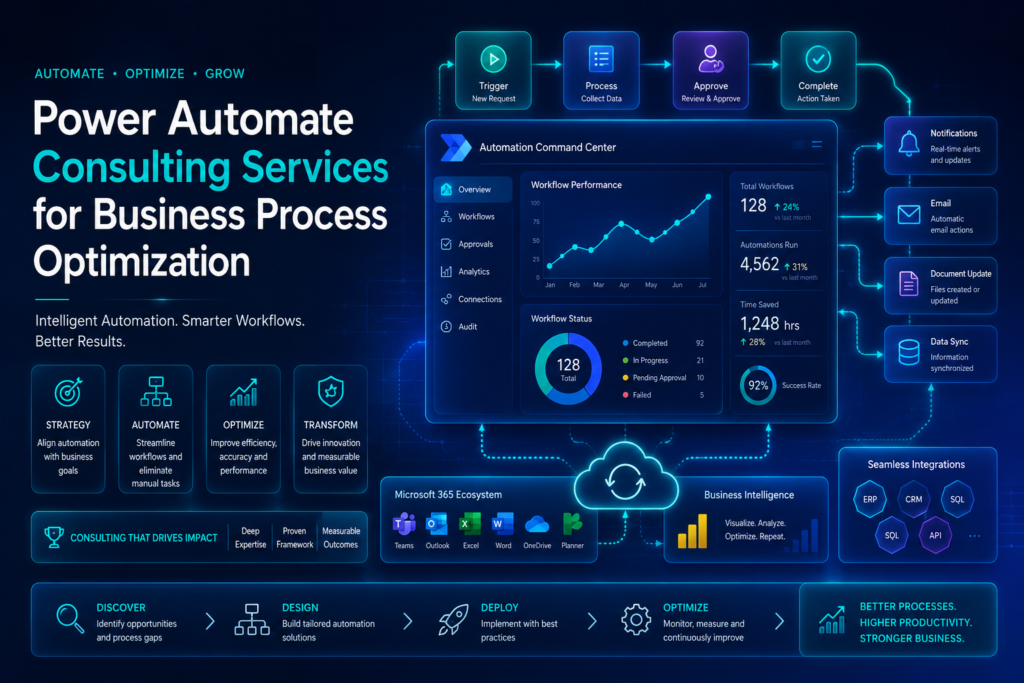
Businesses often know where the pain is but they do not always know the cause. A slow workflow may be caused by unclear ownership poor data quality too many approval steps or disconnected tools. Power automate consulting services help identify the real issue before building automation. This matters because automating a broken process can make the problem faster instead of better. A consultant helps optimize the process first then automate it.
How Consultants Review Existing Workflows
A consultant starts by reviewing how the current workflow works. They look at who starts the process what information is required which systems are involved and where delays happen. This review helps the business understand the true process not just the process written in a document. Employees often use workarounds that managers do not see. A good consultant listens to those details and finds the best automation opportunities. The goal is to streamline the process so the final automation is simple and useful.
How to Implement Power Automate the Right Way
To implement Power Automate correctly a business should begin with one clear workflow. The team should define the trigger actions approval steps data sources and final output before development starts. Power automate implementation should include testing. A flow should be tested with normal cases edge cases missing data and user mistakes. This helps prevent errors after launch. Documentation is also important. The business should know how the flow works who owns it and how to request power automate support if something changes.
How Automation Solutions Improve Resource Allocation
Automation solutions improve resource allocation by reducing low value manual effort. Employees no longer need to spend hours moving data sending reminders or checking status. This gives managers better control over time and capacity. Instead of hiring more people for repetitive work a business can use automation to support existing teams. The practical takeaway is that process automation should free people for better work not simply add more tools.
Power Automate Development and Low Code Automation Solutions
Power automate development helps businesses build workflows that match real operational needs. The low code nature of the platform makes it easier for teams to create and manage flows but planning still matters. A low code tool can reduce technical barriers but it does not remove the need for logic testing and governance. This is why expert help can make the final automation stronger.
Building Power Automate Workflows for Real Business Needs
Power automate workflows should be designed around real business needs. A company should not automate something just because it is possible. It should automate tasks that save time reduce risk or improve service. A good workflow starts with a clear trigger. Then it follows a set of actions that create value. It may update a record send a message request approval or connect different systems. When built well automation becomes part of the normal business process. Employees do not need to chase updates because the system keeps work moving.
Connectors Apps and Services and Third Party Integrations
Connectors allow Power Automate to connect with different apps and services. These may include Microsoft tools cloud based applications and third party systems. A connector can move data from one system to another. It can also trigger an action when something changes. For example a new email can create a task or a new CRM record can start a follow up process. Third party integration is useful when a company uses tools outside Microsoft. The key is to make sure the connection is reliable secure and easy to maintain.
How Low Code Automation Reduces Technical Barriers
Low code automation helps business users and technical teams work together. A team can design a process without building a full custom software system. This can speed up development and reduce cost. It also gives teams more flexibility when business challenges change. However low code does not mean no planning. A poorly designed flow can still cause confusion. The practical solution is to combine low code speed with careful review and testing.
RPA and Robotic Process Automation With Power Automate Desktop
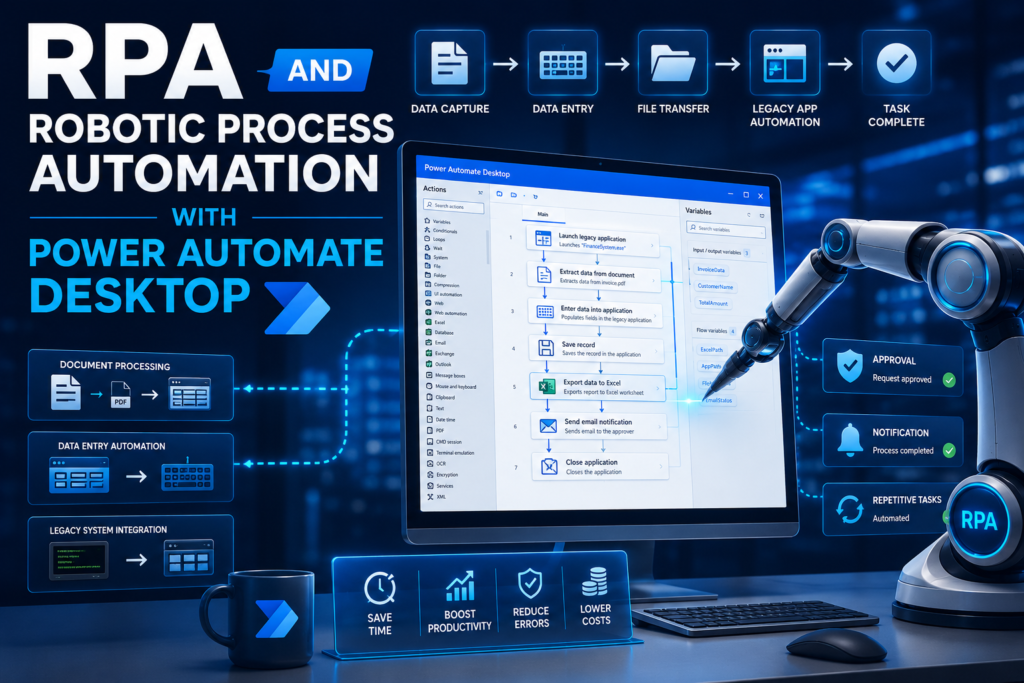
Some business processes cannot be automated only through cloud connectors. Older software desktop applications and legacy systems may not have modern integration options. This is where RPA becomes useful. Power Automate Desktop supports robotic process automation by allowing businesses to automate actions on a computer. It can help with systems that do not support direct cloud automation.
When RPA Is Better Than Cloud Automation
RPA is better when a system has no API, no connector or no easy cloud integration. It can imitate actions that a human performs on a desktop. For example a team may need to copy data from an old application into a modern system. If the legacy system cannot connect directly robotic process automation may help bridge the gap. Cloud automation is usually better for modern apps. RPA is useful when a business must work with older tools.
How Power Automate Desktop Handles Legacy Systems
Power Automate Desktop can help automate desktop tasks such as opening applications entering data moving files and extracting information. This is helpful when legacy systems are still important to daily operations. It can reduce manual effort and improve consistency. However desktop automation should be tested carefully because screen changes or software updates can affect the flow. The best approach is to use RPA where needed and cloud automation where possible.
RPA Example for Inventory Management
In inventory management a company may use an older desktop system to check stock levels. Employees may manually copy data into a spreadsheet and send updates to managers. With RPA Power Automate Desktop can collect the data update the file and send a notification. This saves time and reduces errors. The practical takeaway is that RPA can extend automation to places where modern connectors are not available.
How a Power Automate Consulting Company Can Streamline Operations
A power automate consulting company helps businesses move from idea to working automation. Many teams start with good intentions but struggle with setup testing permissions and long term maintenance. The right company helps streamline operations by combining business understanding with technical delivery. This support is valuable when workflows affect multiple teams or important data.
What to Expect From a Microsoft Partner
A Microsoft partner can help businesses plan automation inside the Microsoft environment. This may include Microsoft 365 SharePoint Power Apps Power BI, Dynamics 365 Azure and Power Automate. A microsoft certified expert understands platform features, permissions connectors and best practices. This helps reduce risk during implementation. A power platform functional consultant can also help connect business requirements with technical design. That makes the final solution easier for employees to use.
Why Integration Expertise Matters
Integration expertise matters because automation often fails when systems do not connect properly. A simple flow may work alone but complex automation needs stable data movement and clear rules. A consultant with integration experience can design seamless connections between tools. They can also identify where a process needs cleanup before automation begins. This makes the final system more reliable and easier to support.
Power Automate Support After Deployment
Power automate support after deployment is important because business processes change. A flow may need updates when a form changes a manager changes or a system is replaced. Support helps keep automation working. It also helps improve flows after employees start using them in real situations. The practical takeaway is that automation is not finished at launch. It needs review improvement and ownership.
Ready to Automate? Steps Before Power Automate Implementation
If your business is ready to automate, do not start by building the first flow that comes to mind. Start by understanding the problem. The best automation begins with clarity. Power Automate can help many teams but the strongest results come when you choose the right process define success and plan the full workflow before launch.
Identify Business Challenges First
Start by identifying business challenges. Look for tasks that take too much time create errors delay customers or require repeated manual checking. You should also ask which process affects revenue service quality or employee workload the most. That helps you prioritize the right workflow. When the problem is clear automation becomes easier to design.
Choose the Right Workflow to Automate
Choose a workflow that is repeated often and follows predictable steps. The first automation project should not be too complex. It should be important enough to matter but simple enough to test properly. Good first examples include approval requests notifications file routing customer follow up reporting updates and internal task creation. This approach helps the team gain confidence before moving to larger projects.
Plan End to End Automation Before Launch
End to end planning means looking at the full process from start to finish. You should define the trigger actions data fields approvals exceptions and final result. Real time updates should be used when fast communication matters. Notifications should be clear so users know what to do next. The mini solution is to map the workflow first then automate it carefully.
Comparison Table Power Automate Consulting vs DIY Automation
Many businesses wonder whether they should build flows themselves or hire a consultant. DIY automation can work for simple tasks but complex processes often need expert planning. The right option depends on your team skill workflow complexity timeline and long term goals.
| Feature | DIY Power Automate Setup | Power Automate Consulting | Best For |
| Setup speed | Can be slow for beginners | Faster with expert planning | Teams needing quick results |
| Workflow quality | Depends on internal skill | Built around business process needs | Companies with important workflows |
| Microsoft integrations | Basic connectors may be enough | Better for Microsoft 365 SharePoint Azure and Dynamics 365 | Businesses using multiple systems |
| RPA support | Harder to manage alone | Stronger planning for robotic process automation | Teams with desktop or legacy systems |
| Long-term support | Internal team must fix issues | Consultant can provide support and optimization | Growing businesses |
| Scalability | Can become messy over time | Designed for scalable automation | Companies planning digital transformation |
| Best outcome | Good for simple flows | Better for complex automation | Teams needing reliable results |
Which Option Is Better for Your Business?
DIY is better when the workflow is simple and your team understands Power Automate. It is also useful when the risk is low. Power automate consulting is better when the workflow affects customers finance operations approvals or important business data. A consultant helps build the system correctly from the start. The practical takeaway is that simple automation can begin internally but important automation should be planned with expert support.
Final Thoughts on Power Automate Consulting and Digital Transformation
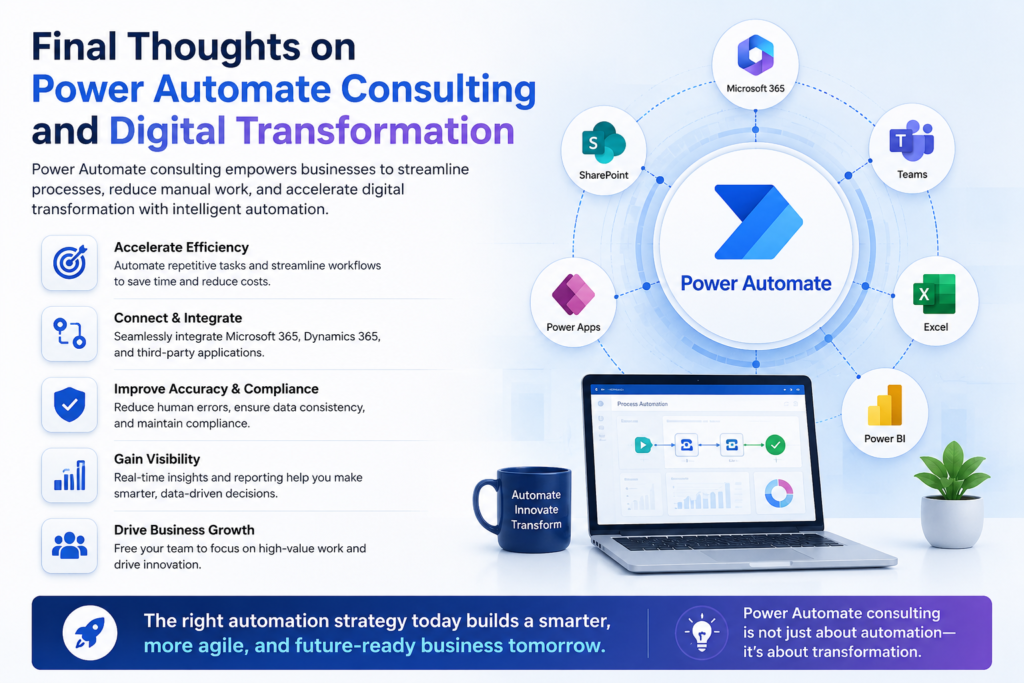
Power automate consulting is valuable because it helps businesses automate the right work in the right way. Microsoft Power Automate is powerful but the best results come from clear planning good process design and careful implementation. A business should not automate every task at once. It should begin with a workflow that creates real value. That may be an approval process reporting update customer follow up inventory task or internal notification flow.
How Power Automate Helps Drive Innovation
Power Automate helps drive innovation by reducing manual work and giving teams more time for higher value tasks. When routine work runs automatically employees can focus on customers decisions and growth. It also supports a stronger transformation journey because automation connects people data and systems. This makes the business faster and easier to manage.
Next Step Toward Workflow Efficiency
The next step is to review one process that slows your team down today. Check where time is wasted where errors happen and where employees repeat the same steps. If the process is simple you can start small. If it affects important operations working with a power automate consulting company can help you build a stronger system. In the end the goal is simple. Use automation to save time improve workflow efficiency and help your business grow with confidence.
Conclusion
Power automate consulting gives businesses a practical way to reduce manual work improve workflow efficiency and build smarter automation inside the Microsoft ecosystem. Instead of depending on slow approvals repeated data entry scattered notifications and disconnected tools businesses can use Microsoft Power Automate to create faster and more reliable processes. The real value of Power Automate comes when automation is planned correctly. A simple flow can save time but a well designed automation system can improve productivity streamline business process steps connect Microsoft 365 SharePoint Power Apps Power BI Dynamics 365 and support better decision making across the company.
A power automate consultant helps businesses choose the right workflow avoid common setup mistakes build scalable flows and manage support after deployment. This is especially useful when automation affects finance, operations customer service approvals reporting or legacy systems that need RPA through Power Automate Desktop.
What is power automate consulting?
Power automate consulting helps businesses plan build and improve workflows using Microsoft Power Automate. A consultant reviews manual processes finds automation opportunities creates flows tests them and supports deployment. The goal is to save time, reduce errors and improve workflow efficiency.
What does a power automate consultant do?
A power automate consultant studies your business process identifies repetitive tasks designs automation connects systems and helps implement Power Automate correctly. They may also support Microsoft 365 SharePoint Power Apps Power BI Dynamics 365 and RPA based workflows.
How can Microsoft Power Automate improve workflow?
Microsoft Power Automate improves workflow by connecting apps sending notifications creating approvals updating records and reducing manual steps. It helps teams automate workflows so information moves faster and employees spend less time on repetitive tasks.
What are power automate consulting services?
Power automate consulting services can include workflow review automation planning Power Automate development connector setup Power Platform integration RPA design testing support and deployment.These services help businesses build reliable automation solutions that match real operational needs.
Can Power Automate connect with SharePoint and Microsoft 365?
Yes Power Automate works well with SharePoint and Microsoft 365. It can create approval flows update lists send Teams notifications organize files and connect data across Microsoft apps. This makes it useful for businesses already using the Microsoft ecosystem.
Is Power Automate good for RPA?
Yes Power Automate can support RPA through Power Automate Desktop. It is helpful when a business needs to automate desktop actions or legacy systems that do not have modern connectors. RPA is best used when cloud automation is not enough.